Inserting Photos Into Posts?

RoyS

Member
Joined
May 13, 2018
Messages
179
Reaction score
538
City & State/Province
Prescott Arizona
Hi Gents,

Sorry for this basic question but I've done a quick search and can't see to find the answer.

Whenever I include a photo in my posts it shows as a 'thumbnail' where many other posters seem to be able to insert a photo right into the post.

How do I do this?

Thanks in advance.

Cheers,

Roy
 
...link below explains BBCode...

BBCode - Wikipedia

...the img code is what your interested in...

...photos must have a URL to direct post them...

...if they don't you must post them on a photo hosting site first...
 
To make your photos appear in your posts, you must have them posted on an image hosting site. Once that's done, it's simply a matter of inserting the URL for the photo between opening and closing IMG tags. In other words, you'd have
.

Most image hosting services provide the appropriate links to do this . . .


7ZsS31Z.jpg
 
Thanks Gents,

Let me give this a try...
 

Attachments

  • IMG-5370.jpg
    IMG-5370.jpg
    66 KB
Last edited:
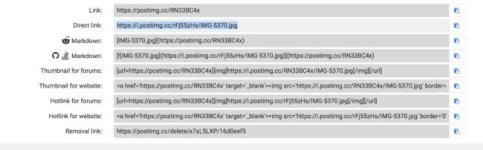
So I tried the postimages.org and as you can see it still inserts it as a thumbnail.

Not sure what I'm doing wrong!

I copied and pasted this link (see 'thumbnail' below).

Cheers,

Roy
 

Attachments

  • Screen Shot 2020-05-10 at 12.40.30 PM.jpg
    Screen Shot 2020-05-10 at 12.40.30 PM.jpg
    24.8 KB
Last edited:
I use the forum as a hosting service.

What I do is post them as a thumbnail first. Then click on the thumbnail, which opens a larger version. Click on that larger image that pops up. That opens a webpage with the image on it. I copy the web page address and then close it. I hit edit on my post, click the img button, and paste it into the IMG window. Click save and done
 
Last edited:
So I tried the postimages.org and as you can see it still inserts it as a thumbnail.

Not sure what I'm doing wrong!

I copied and pasted this link (see 'thumbnail' below).

Cheers,

Roy

Click on the hotlinks for forums tab. (right click) and you'll see a window appear with "copied" in it. Then come back to your forum window and paste.

edit: my mistake Roy, left click on the blue icon to the right of the "hotlinks for forums tab". Then come back to your forum window, right click and paste.
 
Last edited:
...a photo url shown in the forum reply box with the img tags on each side...and the resulting photo post below...

1apicpost.png


pix817390182.jpg
 
Last edited:
I just tried that and it doesn't work for me (wish it did, I like the idea).

I says 'image error' 'invalid file'.
 
Hi,

I'm not sure, I think both. I'm not very tech minded and getting rather confused.

Sorry about this gents.

I think I need an 'idiots' step by step guild.

Cheers,

Roy
 
Last edited:
Hi,

I'm not sure. I'm not very tech minded and getting rather confused.

Sorry about this gents.

I think I need an 'idiots' step by step guild.

Cheers,

Roy

...did you try what I did in post #10?...
 
Last edited:
Rastoff had a very good post on this subject. I still refer back to it when I forget. I'll try and find link
 
So here I go again.

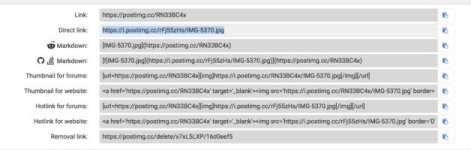
So I went to postimages.org.
Uploaded my images.
Copied the 'direct link' (shown below).
And posted it in the 'ULR' box

And the result...

Both are showing as thumbnails, even thought the screenshot was posted normally and the actual photo had it's link copied/pasted from the image site.

Cheers,

Roy
 

Attachments

  • IMG-5370.jpg
    IMG-5370.jpg
    66 KB
  • Screen Shot 2020-05-10 at 1.35.59 PM.jpg
    Screen Shot 2020-05-10 at 1.35.59 PM.jpg
    25.3 KB
Last edited:
So here I go again.

So I went to postimages.org.
Uploaded my images.
Copied the 'direct link' (shown below).
And posted it in the 'ULR' box

And the result...

Both are showing as thumbnails, even thought the screenshot was posted normally and the actual photo had it's link copied/pasted from the image site.


Cheers,

Roy

...you have to put the img tags on each side of the direct link...
 
Follow Rastoff's instructions. One mistake that popped up when I did it was HTTP was coping twice for some reason. I just erased http so it was only there once in the link and it worked.
 
Back
Top