

You are using an out of date browser. It may not display this or other websites correctly.
You should upgrade or use an alternative browser.
You should upgrade or use an alternative browser.
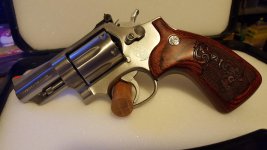
Simply Stunning
- Thread starter opaul
- Start date


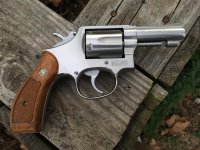

That sure is a pretty gun....but I'll be willing to bet that there will be some folks who think their gun is prettier!!
Just for example...I'm rather partial to this old Colt Army Special, the predecessor of the Colt Official Police. Dates back to 1925. Not a period holster, but I had it, and it is a perfect fit, so I use it. It has some modifications, like the hammer and the checkered front and back straps, and the ivory grips:

Best Regards, Les
Just for example...I'm rather partial to this old Colt Army Special, the predecessor of the Colt Official Police. Dates back to 1925. Not a period holster, but I had it, and it is a perfect fit, so I use it. It has some modifications, like the hammer and the checkered front and back straps, and the ivory grips:

Best Regards, Les
Last edited:
OP
opaul
US Veteran



Just another old Smith and a Colt [emoji1]


revolver_ph
Member
Yes, that is a handsome critter. BUT:

OP
opaul
US Veteran
Only a gun guy knows the feeling. I've got some beauties too. If I ever figure out how to post a photo, I will.
Save your photo to your desktop (or pictures file), click on the drop down box with the paper clip in the advanced setting (this is where you post your replies). When that box opens, select browse and desktop when your browser window opens, right click the photo that you saved to your desktop that you want to post and choose select. The dialog message will say photo uploading once that's done, you can choose a few more or just post your picture.
Hope this helps.
Last edited:

DocB
Member
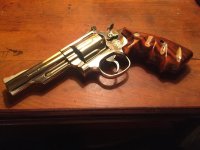
OP
opaul
US Veteran


Save your photo to your desktop (or pictures file), click on the drop down box with the paper clip in the advanced setting (this is where you post your replies). When that box opens, select browse and desktop when your browser window opens, right click the photo that you saved to your desktop that you want to post and choose select. The dialog message will say photo uploading once that's done, you can choose a few more or just post your picture.
Hope this helps.
This method of posting photos works great, but be aware there is a size limit to the file. You will get a dialogue box that tells you the maximum dimensions. This will attach a postage stamp image that the reader can click to enlarge. If you want to insert full sized images inline within the text of the post, you will have to first place your picture on another "hosting" site such as photobucket, then link to the forum post. A bit more involved, but this is the only way to get a very high resolution photo on the forum. I believe the limits save bandwidth on this site. Otherwise, us photo crazy picture lovers would overload the site. You can see examples of both methods in the posts above.

bravastar1
Member
Here is one of my stun guns. Don't yell at me,the Colt started this.

OP
opaul
US Veteran
This method of posting photos works great, but be aware there is a size limit to the file. You will get a dialogue box that tells you the maximum dimensions. This will attach a postage stamp image that the reader can click to enlarge. If you want to insert full sized images inline within the text of the post, you will have to first place your picture on another "hosting" site such as photobucket, then link to the forum post. A bit more involved, but this is the only way to get a very high resolution photo on the forum. I believe the limits save bandwidth on this site. Otherwise, us photo crazy picture lovers would overload the site. You can see examples of both methods in the posts above.
Good feedback. I personally don't use hosting sites, but I guess I could give it a try.
Last edited:
How about this old girl?? Personally, I think she's still stunning, even though she was born way back in 1979!!!

Best Regards, Les

Best Regards, Les

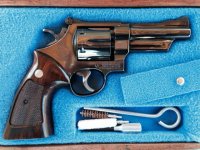
...I know guns are only objects however this 65-3 is about as pretty as they come - in the eye of the beholder.
A 3 inch 65 is all you ever need.


A worn 22


revolver686
Member
- Joined
- Mar 2, 2012
- Messages
- 184
- Reaction score
- 290
686-4, a beauty and a beast:

DocB
Member
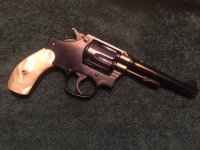
I should have mentioned when I posted that nickel 19-5, my wife says they all look the same to her. The only Smith I've ever bought that my wife said looked different and stunning is this one. First time she has ever said, "That's a pretty gun." So, according to my wife, this is my most stunning gun. . .99% 32 caliber circa 1929 with factory MOP grips.
Attachments
That is sooooo purty!686-4, a beauty and a beast:
K-38 Masterpiece


Birdgun
Member
Now this little lady may have some years (circa 188?), but she is prettied up and ready for a night out.
S&W 4th Model "Pocket Gun" in .32 S&W.


Thanks for looking.
God bless,
Birdgun
S&W 4th Model "Pocket Gun" in .32 S&W.
Thanks for looking.
God bless,
Birdgun
Last edited:
Birdgun
Member
Flawless beauty.
15-4 "Combat Masterpiece"

Thanks for viewing this classic beauty.
God bless,
Birdgun
15-4 "Combat Masterpiece"
Thanks for viewing this classic beauty.
God bless,
Birdgun
Brian in Oregon
Member
- Joined
- Feb 26, 2015
- Messages
- 678
- Reaction score
- 914

Did someone say purty guns? Reverse Pinto Model 29-2, letters to 1968.
HOUSTON RICK
Member
Simplicity:


Here's a couple from the safe:


If they weren't purty, I wouldn't have bought them!


If they weren't purty, I wouldn't have bought them!

DevilDog72
US Veteran
I have posted this old girl before....but, y'all are forcing me to add my 2 cents:


JohnRippert
Member
While I have one and agree that the M65 is a handsome firearm, I don't think I could ever call a stainless revolver "stunning".

Now my Model 19-2 is to me quite stunning.

Now my Model 19-2 is to me quite stunning.
Richard Simmons
Member
These gals sure look pretty to me.


Frizzman
US Veteran
Wow!...I guess I'm old because the instructions on how to put pictures on here left me mystified in the first sentence.
I have a few S&W revolvers and other revolvers and pistols. I recently got a very clean M65-2 three inch that I like quite a bit. I will hopefully learn how to put some pictures of my nicer shooters up someday...I see some handsome example on here today!
I have a few S&W revolvers and other revolvers and pistols. I recently got a very clean M65-2 three inch that I like quite a bit. I will hopefully learn how to put some pictures of my nicer shooters up someday...I see some handsome example on here today!
Last edited by a moderator:

69HEMI-R/T
Member
You will figure it out Frizzman. It really is pretty simple when you use A hosting site such as Photobucket.
This is an unfired except at the factory Model 586 no dash.

And, this is my Model 18-2

This is an unfired except at the factory Model 586 no dash.
And, this is my Model 18-2
Last edited:
Similar threads

- Replies
- 9
- Views
- 413


- Replies
- 15
- Views
- 414


