

THE PILGRIM
Member
windows 8 did come as a shock as it's very different from Win 7.
Win 8.1 takes a step back and allows you to set up your screen so it looks a lot like Win 7.
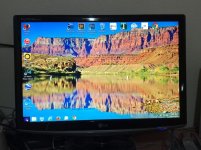
Here's a pic of my desktop with 8.1.
Notice the purple flag, lower LH. Sort of like a start button.
Bottom toolbar- file explorer, control panel, explorer, Fox Fire, mail and Chrome.
Notice I have pinned shortcuts to several of my most used programs to the screen.
Like iTunes, OpenOffice, Photoshop, eBay, etc.
The other stuff I get to by mousing on the flag Lower LH.
Shutdown? Right click on the flag. That shows a Popup with other choices.
Get yours setup like this for a no drama computer experience.
Win 8.1 takes a step back and allows you to set up your screen so it looks a lot like Win 7.
Here's a pic of my desktop with 8.1.
Notice the purple flag, lower LH. Sort of like a start button.
Bottom toolbar- file explorer, control panel, explorer, Fox Fire, mail and Chrome.
Notice I have pinned shortcuts to several of my most used programs to the screen.
Like iTunes, OpenOffice, Photoshop, eBay, etc.
The other stuff I get to by mousing on the flag Lower LH.
Shutdown? Right click on the flag. That shows a Popup with other choices.
Get yours setup like this for a no drama computer experience.
Attachments
Last edited:


