Windows 10 Update

soFlaNative

Member
Joined
Jun 4, 2014
Messages
11,918
Reaction score
28,517
City & State/Province
Hollywood
I was informed yesterday there is an option to enroll in extended security updates for Windows 10.

https://www.microsoft.com/en-US/windows/extended-security-updates

Good news for those like myself who will hold off installing new versions until there is no other option.
Simple process and no fee I'm not sure this offer will extend past the 14 Oct cut off day for support.
 
I detest Microsoft... they seem to relish making things more complex and expensive for those of us uninterested in getting a computer science degree just to live with our desktops. Particularly infuriating is the push for everything to be 'cloud' based, with even some windows utilities requiring an internet connection to work. I'd like to be able to use my computer without needing it to be connected to the whole world just so I can use the calculator...

Hyperbole, to some extent, but there's no question that every new version of Windows is more intrusive and wants to see more of your information than the last... we are the product, and they've learned they can charge us to let them mine our data.
 
I finally went to windows 11 a few months back due to 10 being unsupported any more. My IT guy had recommended NO for a long time but recently said they had it more or less worked out. Transition was seamless as far as I could tell.
 
I have gone from Windows 10 to Windows 11 on all my computers at home, including a 13 year old laptop that was not at all eligible for a upgrade. There are many tutorials on Youtube to be able to upgrade easily. It does take a bit of computer savvy, but it is not too bad. I have had no issues with Windows 10 or 11 since using them. The main thing to remember is to backup, backup, backup. The more often you do, the less you lose if there is a hardware or software issue on your computer.
 
Last edited:
When 11 came out my laptop couldn't take it. Then that laptop bit the dust and had to buy a new one and it came with 11 installed and it wasn't a big deal to me. My wife's laptop on the other hand is new enough to run 11 but my wife doesn't deal with change real well so she is still running 10 on hers.
 
I detest Microsoft... they seem to relish making things more complex and expensive for those of us uninterested in getting a computer science degree just to live with our desktops. Particularly infuriating is the push for everything to be 'cloud' based, with even some windows utilities requiring an internet connection to work. I'd like to be able to use my computer without needing it to be connected to the whole world just so I can use the calculator...

Hyperbole, to some extent, but there's no question that every new version of Windows is more intrusive and wants to see more of your information than the last... we are the product, and they've learned they can charge us to let them mine our data.
This is true. Especially when I relied on them to make a living as the CAD program I used only ran on Windows. I had to hire 'VARS' and whatever experts I could find just to keep the program running. And I found out that the official 'VARs' all had different ideas how to go about it, with each of them unfixing the fixes the others did. One time a rep told me, "You have to be very careful how you pick your VARs". Obvious comment of the year. They were all SUPPOSED to be vetted but the process probably entailed telling them they were qualified. I'm sure that took a couple of years off my life. Between the operating system and IBMs equipment and management it made life hell for me. I used to work in an office trailer and I wondered what people would think if they walked down the breezeway and my computer was in pieces on the sidewalk.
 
Updating an unsupported older computer with W10 to W11 is not that difficult. Just Google. There is free Software to do it, it just takes some time to do. Look at my upgrade posting in “similar threads” below. Best to hurry, only two days left to go. I still have one more older laptop to convert.
 
Happily chugging along here on Win7. :cool:
You can do that if your computing needs are fairly elementary. But early versions of Windows cannot be updated. That creates potentional security issues. Plus some newer software will not run on older Windows versions. For example, beginning with TY 2025, TurboTax will require Windows 11 to operate. If all you need a computer for is to do tasks like web browsing, word processing and spreadsheets, then about any old computer using an early version of Windows will be adequate. Nothing wrong with keeping W7 and old software working if it does what you need done. I am still using a 2002 version of Microsoft Office with my newer computers having W11, no reason to change to a 360 version of Office that does exactly the same stuff.
 
Last edited:
When 11 came out my laptop couldn't take it. Then that laptop bit the dust and had to buy a new one and it came with 11 installed and it wasn't a big deal to me.
The same thing happened to me. My computer went kaput and so I ended up buying a new one that was loaded with Windows 11. The one saving grace was that the new computer had about twice the horsepower of the old computer. I hated spending the money but at least I caught a sale price.
 
I dealt with the update problem last night. I've got 2 desktop computers running WIN 10 (not updateable to WIN 11) and 2 laptops running WIN11. I signed up for support to '26 on the PC'S which is supposed to cover 8 machines.
 
The free tool that allows you to do an install/upgrade of 10 to 11 is called Rufus. It has lots of options to override the hardware, bios, and security restrictions and create a new Win 11 iso file, which can be loaded onto a flash drive.
 
Windows update had been nagging me to go to Windows 11 for the last year or so. I always declined as I a believe in the "If it's not broke" philosophy. Well now that 10 is at end of life, I've been looking for the nag note in Windows Update. It hasn't reappeared. Windows update says my computer is compatible and eligible, but only offers the extended support.

I know I can force the update, but Dell suggests that I let Windows update do its thing. I wonder if Microsoft is planning to back down on 10's end of life date? Maybe extract all the $$ they can before the cry "uncle." I'm tempted to just force the 11 update and be done with it.
 
Windows update had been nagging me to go to Windows 11 for the last year or so. I always declined as I a believe in the "If it's not broke" philosophy. Well now that 10 is at end of life, I've been looking for the nag note in Windows Update. It hasn't reappeared. Windows update says my computer is compatible and eligible, but only offers the extended support.

I know I can force the update, but Dell suggests that I let Windows update do its thing. I wonder if Microsoft is planning to back down on 10's end of life date? Maybe extract all the $$ they can before the cry "uncle." I'm tempted to just force the 11 update and be done with it.
My DIL did that change for me a few weeks ago. The computer asked she let it happen. Was not near as bad as I thought things would be. Yes there are a few differences but with my limited (AKA lack of computer skills) so far no problems.

I had her do it as I have often stated my cat knows more about the computer than I know and DIL is pretty tech savvy.
 
The free tool that allows you to do an install/upgrade of 10 to 11 is called Rufus. It has lots of options to override the hardware, bios, and security restrictions and create a new Win 11 iso file, which can be loaded onto a flash drive.
Flyby 11 also works. Download an installation file, download the Win 11 .iSO file, then let the installation file do its work.
 
Flyby 11 also works. Download an installation file, download the Win 11 .iSO file, then let the installation file do its work.
Or you can do a simple registry edit to make it work.

Launch regedit

navigate to HKEY_LOCAL MACHINE\SYSTEM\Setup\MoSetup

right click in the right side panel and select NEW>DWORD (32-bit) VALUE
and type in AllowUpgradesWithUnsupportedTPMOorCPU

Then double click that DWORD which opens a dialog box. In that dialog box under Value data type 1 then click OK.

Now you should be able to install 11 on your older machine.
 
Or you can do a simple registry edit to make it work.

Launch regedit

navigate to HKEY_LOCAL MACHINE\SYSTEM\Setup\MoSetup

right click in the right side panel and select NEW>DWORD (32-bit) VALUE
and type in AllowUpgradesWithUnsupportedTPMOorCPU

Then double click that DWORD which opens a dialog box. In that dialog box under Value data type 1 then click OK.

Now you should be able to install 11 on your older machine.
Probably several ways to do it. Flyby11 easily did the upgrade job for me on three laptops and for free. The mystery to me was why MS didn’t design W11 to load over W10 in every computer using W10 instead of forcing so many owners to do a workaround. I also did the W11 upgrade on a friend’s laptop this afternoon using Flyby (really I just guided him through the procedure over the phone). It worked. From what I have read, the free W10 to W11 upgrade for computers using W10 will continue indefinitely, it did not end today. Only thing that happened is that MS support for W10 ceased today.
 
Last edited:
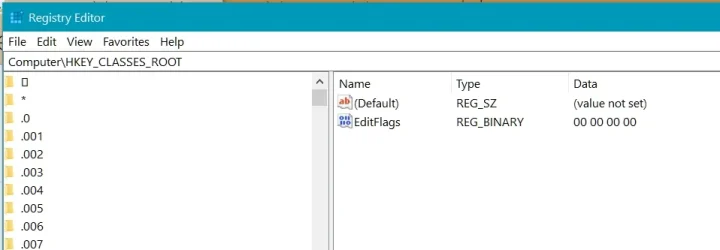
I'm staying with WIN10 for a while, as WIN12 is commin. I signed up for WIN10 EXTENDED updates a couple of days ago. Updates downloaded for me and applied this morning. If you're a fumble fingers like me I'd recommend you backup the Registry (if you go that route) before you make any changes. The attached pic shows REGEDIT opened. To backup the registry Clik on FILE and select EXPORT. Save the file and take note of where you put it.regtistryy.webp
 
Last edited:
The mystery to me was why MS didn’t design W11 to load over W10 in every computer using W10 instead of forcing so many owners to do a workaround.

11 is designed to run on higher horsepower which most 10s didn't come with. In addition, those factory 10 units don't have the hardware to take full advantage of 11. That's why.
 
I just upgraded Win 10 to Win 11 on my laptop. It was uneventful.

For the last couple years, Windows Update has been trying to get me to move to 11, but I always declined. Now that Win 10 hit its end of life, the Win 11 nag never came back. When I finally got around to upgrading, Windows decided to be coy.

Windows Update said my computer is compatible. The drivers and BIOS are current, yet the upgrade hasn't been offered. OK then. . . .

I went to the Microsoft website and asked the AI chatbot what to do. It directed me to download the Windows 11 Installation Assistant. I did and followed the directions. About an hour later, I'm on Win 11 without any (so far) hiccups. Nothing dramatically different from Win 10, but there are some things that make me wonder "why?"

So far so good. My commonly used programs are working. I tweaked a few settings to make 11 more familiar to me, but that's it so far. Time will tell, but the initial impression is positive.

My 20 m$ is go ahead an upgrade if your computer is compatible, or you can fool it into compatibility with a reg hack or 3rd party app. Better than paying Microsoft $$ for another year on Win 10.
 
The major differences from 10 to 11 are Control Panel things have moved, and harder to get to, and personal tweaks and settings are difficult to save without a M$ account. Then, some software will not run on it until you upgrade them, as well.
 

Latest posts

Back
Top